
Databases
Deploy a database from the catalog — fully managed engines like PostgreSQL and MySQL, or one-click database engines and tools like ClickHouse, Kafka, and phpMyAdmin.
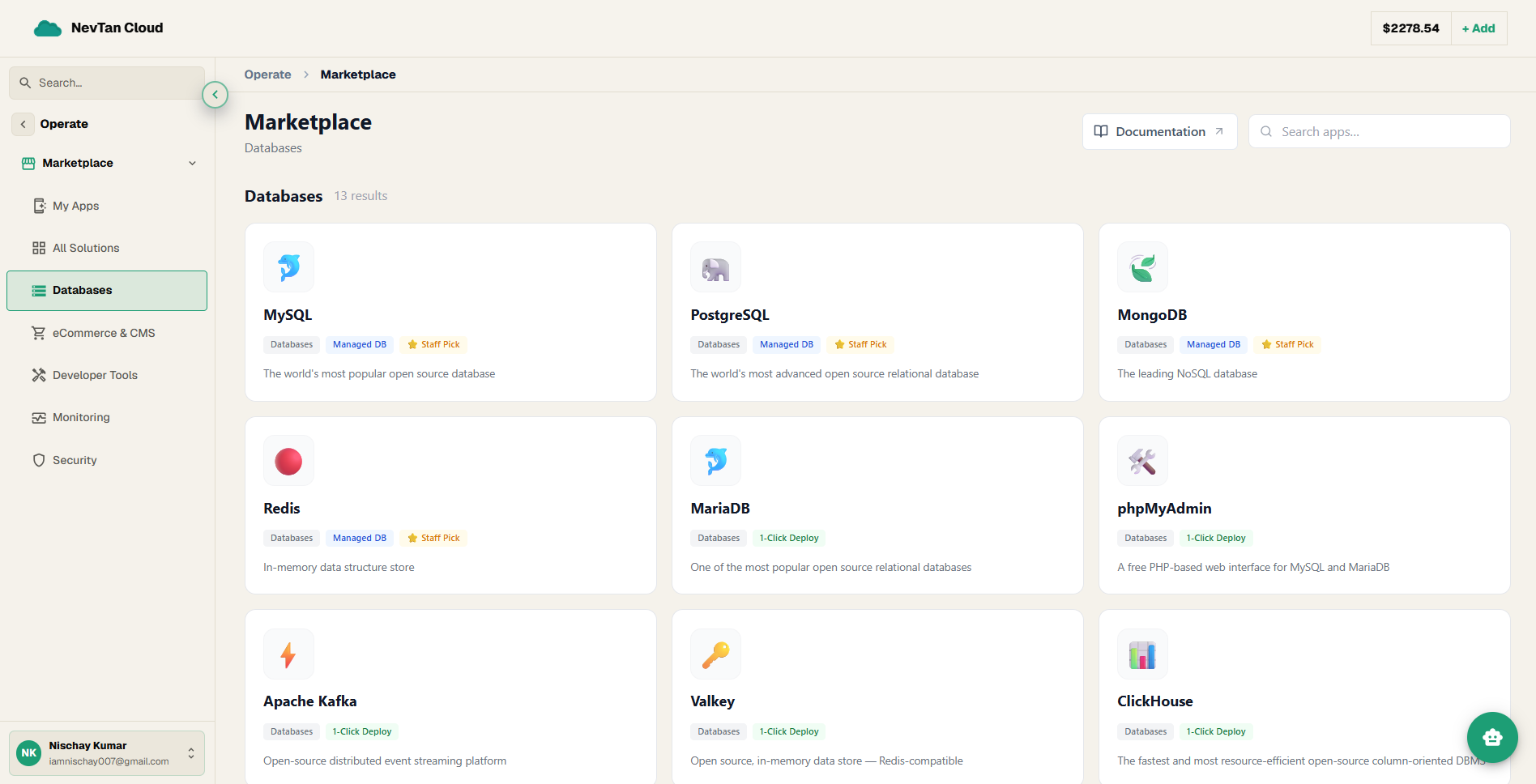
The Databases category is the largest in the Marketplace — thirteen apps in all, split between fully Managed DB engines and 1-Click Deploy database engines and tools. Pick the one that fits, fill in a short form, and NevTan provisions it for you.
Two kinds of database
Four core engines — PostgreSQL, MySQL, MongoDB, and Redis — deploy as a fully managed database: NevTan generates the password, and once it is ready you get a full set of connection details. Everything else in the category is a 1-Click Deploy container — either a database engine (like ClickHouse or RethinkDB) or a database tool (like phpMyAdmin) that runs as an ordinary App Platform project.
Apps in this category
| App | Deploy type | What it is |
|---|---|---|
| MySQL | Managed DB | The world's most popular open source database |
| PostgreSQL | Managed DB | The world's most advanced open source relational database |
| MongoDB | Managed DB | The leading NoSQL database |
| Redis | Managed DB | In-memory data structure store |
| MariaDB | 1-Click Deploy | One of the most popular open source relational databases |
| phpMyAdmin | 1-Click Deploy | A free PHP-based web interface for MySQL and MariaDB |
| Apache Kafka | 1-Click Deploy | Open-source distributed event streaming platform |
| Valkey | 1-Click Deploy | Open source, in-memory data store — Redis-compatible |
| ClickHouse | 1-Click Deploy | The fastest and most resource-efficient open-source column-oriented DBMS |
| RethinkDB | 1-Click Deploy | The open-source database for the realtime web |
| PocketBase | 1-Click Deploy | Open-Source backend for your next SaaS and Mobile app |
| Elasticsearch | 1-Click Deploy | Distributed, RESTful search and analytics engine |
| HarperDB | 1-Click Deploy | Globally-distributed edge application platform |
Every app in this category, explained
If a name below is unfamiliar, this section explains what the software actually is in plain language before you decide whether to deploy it.
🐬 MySQL
MySQL is a relational database — software that stores information in organized tables of rows and columns, much like a very powerful spreadsheet, and lets programs ask questions of that data using a language called SQL. It's the single most widely used open-source database in the world.
🐘 PostgreSQL
PostgreSQL (often called "Postgres") is also a relational database, but it's known for supporting more advanced data types and stricter rules for keeping data correct and consistent — a common choice as an application's data or queries get more complex.
🍃 MongoDB
MongoDB is a NoSQL database, meaning it stores data as flexible, document-shaped records (similar to a JSON object) instead of rigid rows and columns — a natural fit when your data doesn't always follow the exact same shape.
🔴 Redis
Redis is an in-memory data store — it keeps its data in a computer's fast working memory (RAM) rather than on a slower disk, making it extremely quick to read and write. It's commonly used as a cache: a temporary, fast-access copy of data an app looks up often, so it doesn't have to ask a slower database every time.
🐬 MariaDB
MariaDB is a relational database created by the original developers of MySQL, built as a drop-in replacement for it — if you already know MySQL, you already know most of MariaDB.
🛠️ phpMyAdmin
phpMyAdmin is not a database itself — it's a web-based admin tool for viewing and managing a MySQL or MariaDB database through your browser, instead of typing commands.
⚡ Apache Kafka
Apache Kafka is an event streaming platform — a system for reliably moving a continuous flow of small messages ("events", like "order placed" or "user signed up") between different parts of an application, at large scale.
🔑 Valkey
Valkey is an in-memory data store that works the same way as Redis and is compatible with it — it was created by the open-source community as an alternative after changes to Redis's own licensing.
📊 ClickHouse
ClickHouse is a column-oriented database — it stores and reads data column by column rather than row by row. That layout makes it extremely fast at questions that scan millions of rows to compute one number (like "total sales last month"), which is why it's popular for analytics.
🔄 RethinkDB
RethinkDB is a NoSQL database, like MongoDB, but built with a particular focus on "realtime" apps — ones that need to be told immediately when data changes, instead of repeatedly asking "has anything changed yet?"
📦 PocketBase
PocketBase bundles a small database with a ready-made backend — user accounts, file storage, and an API — in a single lightweight package, aimed at quickly building the server side of an app without assembling those pieces yourself.
🔎 Elasticsearch
Elasticsearch is a search and analytics engine — it indexes large amounts of text and data so you can search through it and analyze it quickly and flexibly.
🗃️ HarperDB
HarperDB combines a database with application-hosting features in one platform, with a particular focus on running close to users in many locations at once (an "edge" platform) rather than from one central location.
Deploying a managed engine, in short
The four Managed DB engines above (MySQL, PostgreSQL, MongoDB, Redis) all use the same form — a database name, a username, a network choice, a region, and a size. The password is generated for you. For the complete, field-by-field walkthrough with screenshots, see Guide 1 on Deploying apps.
Deploying a 1-Click database tool, in short
Every other app in this category uses the shorter 1-Click form — a name, a region, and a size, with optional environment variables. For the complete walkthrough with screenshots, see Guide 2 on Deploying apps.
The full, beginner-friendly deploy walkthrough for any marketplace app.
Manage a deployed managed engine — connecting, versions, and trusted sources.
Search and filter the whole catalog, across every category.
Configure a database tool by pointing it at your engine.