
App Platform
Git-based deploys of any repo — Next.js, FastAPI, Go, or a raw Dockerfile — with auto-detected builds, zero-downtime rollouts, custom domains, and auto-deploy on push.
App Platform turns a GitHub repository into a running service. Point NevTan at a repo and branch from the dashboard, and it detects the framework, builds a container image, and rolls it out behind a public URL — with zero-downtime rollouts, custom domains, and auto-deploy on every git push.
If this is your first time deploying anything: right now your code only runs on your own computer. "Deploying" means putting a copy of it on a server that's always on, so it gets a real web address anyone can open — not just localhost. Normally that means renting a server, installing the right runtime, configuring a process manager, and setting up your own build pipeline. App Platform replaces all of that with one flow: connect the repo, click deploy, get a URL.
main). Framework — the tool your app is built with (Next.js, FastAPI, Django, Go…) — NevTan looks at your repo's files to guess this automatically. Container / container image — a self-contained, runnable package of your app plus everything it needs to run, built from your code. Zero-downtime rollout — the new version is fully built and checked before it replaces the old one, so visitors never hit a broken or half-started app in between.What it does
- Auto-detected builds — common frameworks (Next.js, FastAPI, Go, and more) are recognised and containerised automatically. Repos with a
Dockerfilebuild exactly as written. - Zero-downtime rollouts — a new deployment is built and health-checked before traffic moves to it, so a bad build never takes your app down.
- Custom domains — attach your own domain with DNS verification, or use the default
*.nevtan.appsubdomain. - Auto-deploy — enable a toggle so every push to your deploy branch ships automatically.
- Live resizing — change the resource preset (CPU / RAM / storage) of a running project, or turn on auto-scaling.
Quickstart
- 1Connect GitHubLink your GitHub account so NevTan can read the repo and offer auto-deploy. See GitHub integration.
- 2Deploy from the consolePick a repo and branch. NevTan detects the framework, builds an image, and provisions the service.
- 3Watch it go liveWatch live build logs and status right in the console, then open the default subdomain once it reports healthy.
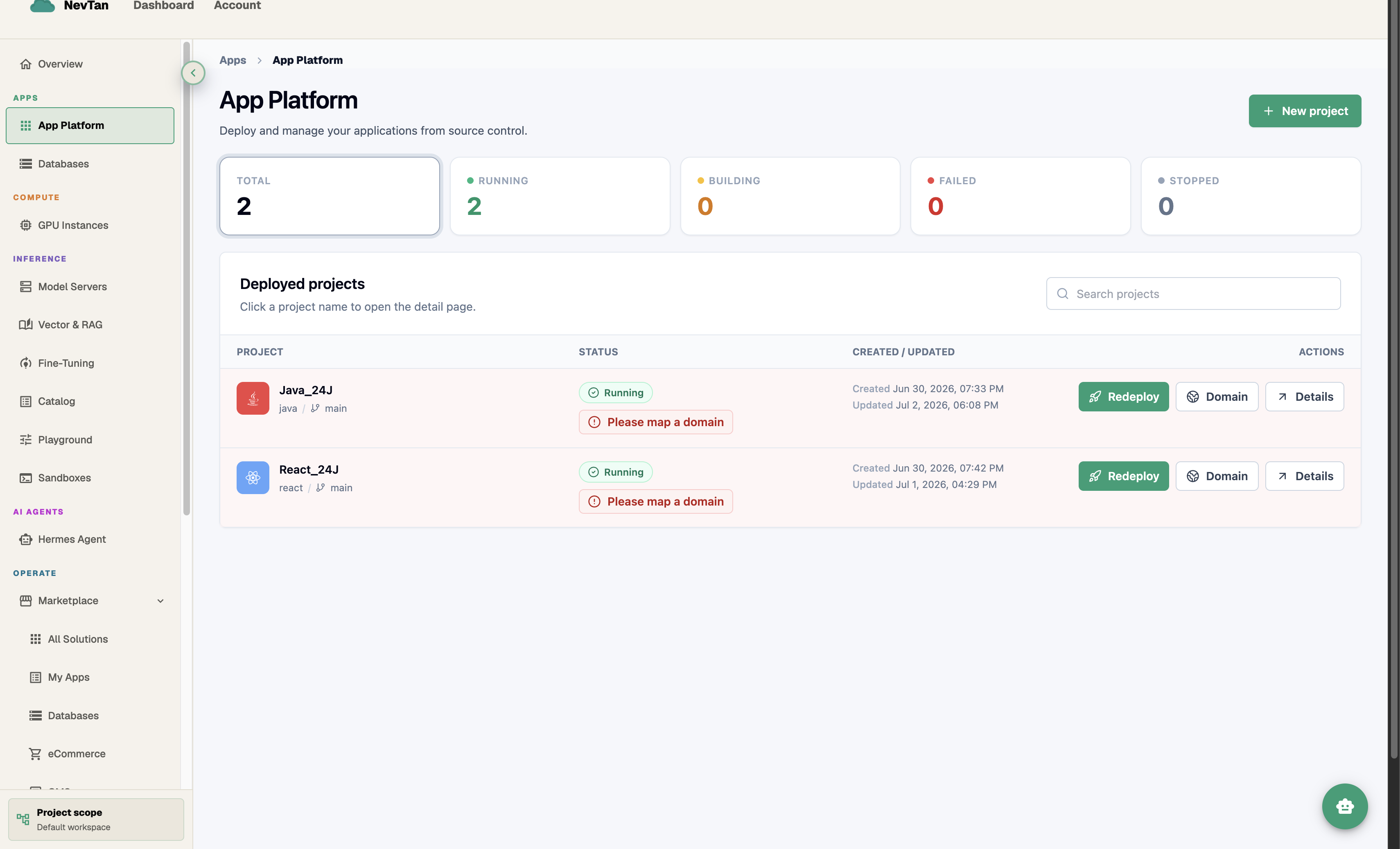
The App Platform page
The page opens with five live counts — Total, Running, Building, Failed, and Stopped — across every project you've deployed, so you can spot a problem before opening any single project.
Below that, the Deployed projects table lists each project with its name, tech stack, branch, live Status, and Created/Updated dates, plus quick Redeploy, Domain, and Details buttons right on the row — you don't have to open a project just to redeploy it or jump to its domain settings.
Explore
Create a project from a GitHub repo and branch, and understand how build + deploy works.
Use the auto-generated Dockerfile or bring your own — view, save, and reset it.
Set env vars and secrets for a project, then redeploy to apply them.
Attach a domain, verify DNS, and manage the default subdomain.
Ship automatically on git push with one toggle.
Change the CPU / RAM / storage preset live and enable auto-scaling.
Stream logs, stop / resume, cancel, and roll back with a redeploy.
Group projects together and chart their logs side by side on a shared Grafana dashboard.
Invite teammates to a project and manage their roles.
Compute tiers from Starter to Enterprise.