
Model catalog
Browse hosted models across every modality, plus your own GPU model servers, in one unified catalog.
The catalog lists hosted models reachable via BYOK. Each id is provider/model; filter by modality, provider, or attributes like ZDR and free-tier. (Your own GPU servers are a separate feature — see Model servers.)
Base: https://api.cloud.nevtan.com/api/v1GET
/gateway/modelsList the unified catalog. Supports filters below.Query parameters
| Parameter | Type | Description |
|---|---|---|
type | string | Modality: text, code, image, video, embed, rerank, realtime, speech, transcription, or all. |
provider | string | Filter by serving provider slug, e.g. anthropic. |
zdr | boolean | Only Zero-Data-Retention models. |
freeTier | boolean | Only free-tier models. |
q | string | Free-text search over id and name. |
sort | string | released (default), price, latency, throughput, or name. |
Example model ids
| Model id | Modality | Provider |
|---|---|---|
anthropic/claude-sonnet-5 | Text | Anthropic |
openai/gpt-4o | Text | OpenAI |
gemini/gemini-3-flash | Text | |
openai/text-embedding-3-large | Embed | OpenAI |
xai/grok-imagine-video-1.5 | Video | xAI |
openai/whisper-large-v3 | Transcription | OpenAI |
Browse the catalog in the console
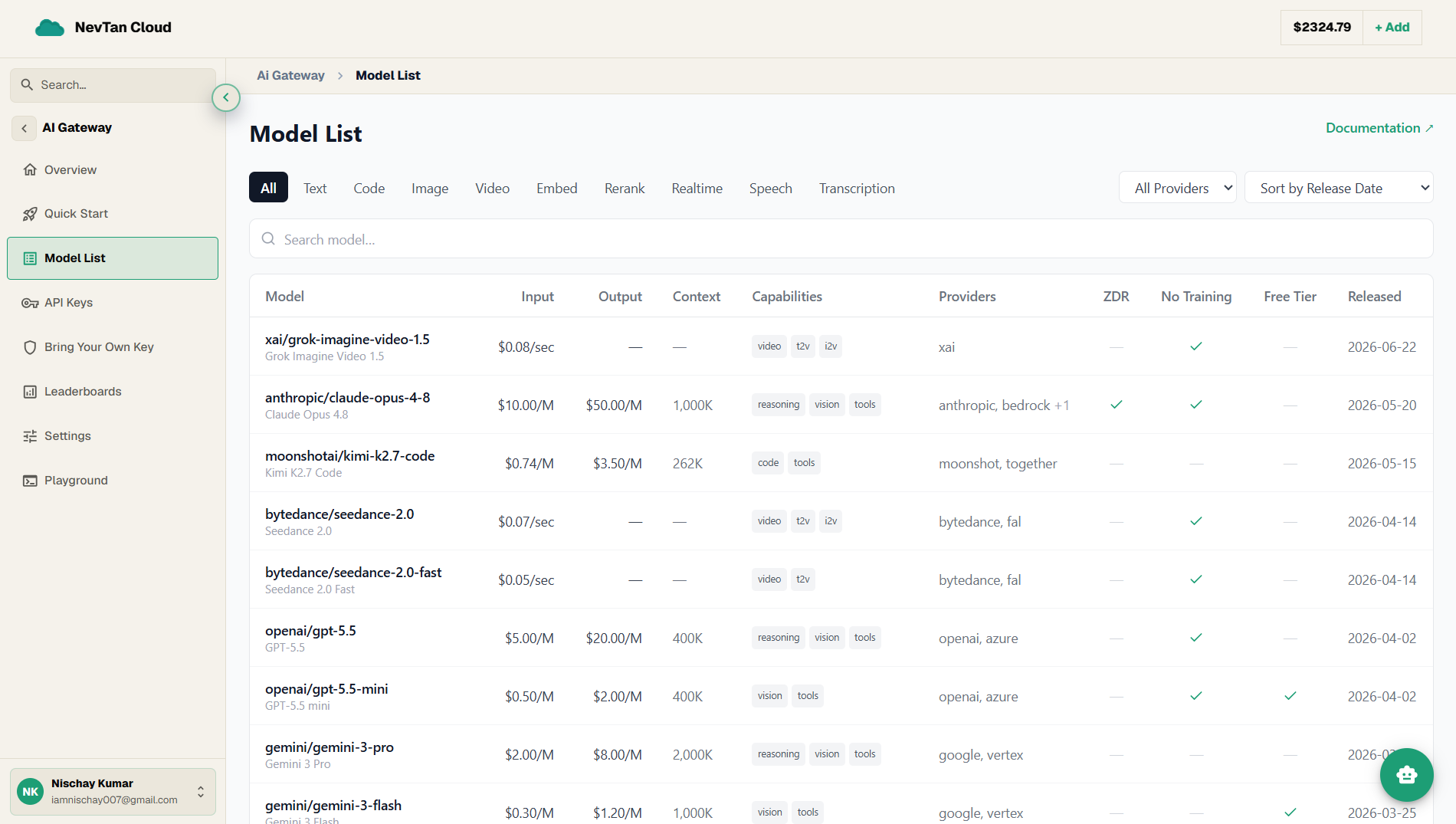
The Model List screen is the visual version of this endpoint — the same models, with filters and a sortable table instead of query parameters.
- 1Open Model ListIn the AI Gateway, open Model List.
- 2Filter by modalityUse the tabs (All, Text, Code, Image, Video, Embed, Rerank, Realtime, Speech, Transcription) to narrow to the kind of model you need.
- 3Narrow by provider and sortPick a provider from the dropdown, and sort by Release Date, Price, Latency, Throughput, or Name.
- 4Search by nameType any part of a model id or name to jump straight to it.
What each column shows
| Column | What it shows |
|---|---|
| Model | The provider/model id plus the display name. |
| Input / Output | Price — per 1M tokens for text models, or per image / per minute / per second for media models. |
| Context | Context-window length (e.g. 200K). |
| Capabilities | Tags for what the model can do. |
| Providers | Which upstream providers can serve the model. |
| ZDR | Whether a Zero-Data-Retention route is available. |
| No Training | Whether the provider will not train on your data. |
| Free Tier | Whether a free tier is available. |
| Released | The release date. |
Tip
Switch models by changing one string — the request and response shape stay identical across providers.