
Deploy from git
Create a project from a GitHub repository and branch, and follow the build-and-deploy lifecycle from the console.
Pick a repo and branch in the console — NevTan builds it, deploys it, and keeps it live.
Deploy
Point NevTan at a repo and branch from the dashboard. From there, four steps take you from repo to running app. You never leave the browser and never touch a terminal — each step below is one screen in the console, and you'll see the next one only after you've made a choice on the current one.
- 1Select a stackNevTan auto-detects your framework, or you pick one manually.
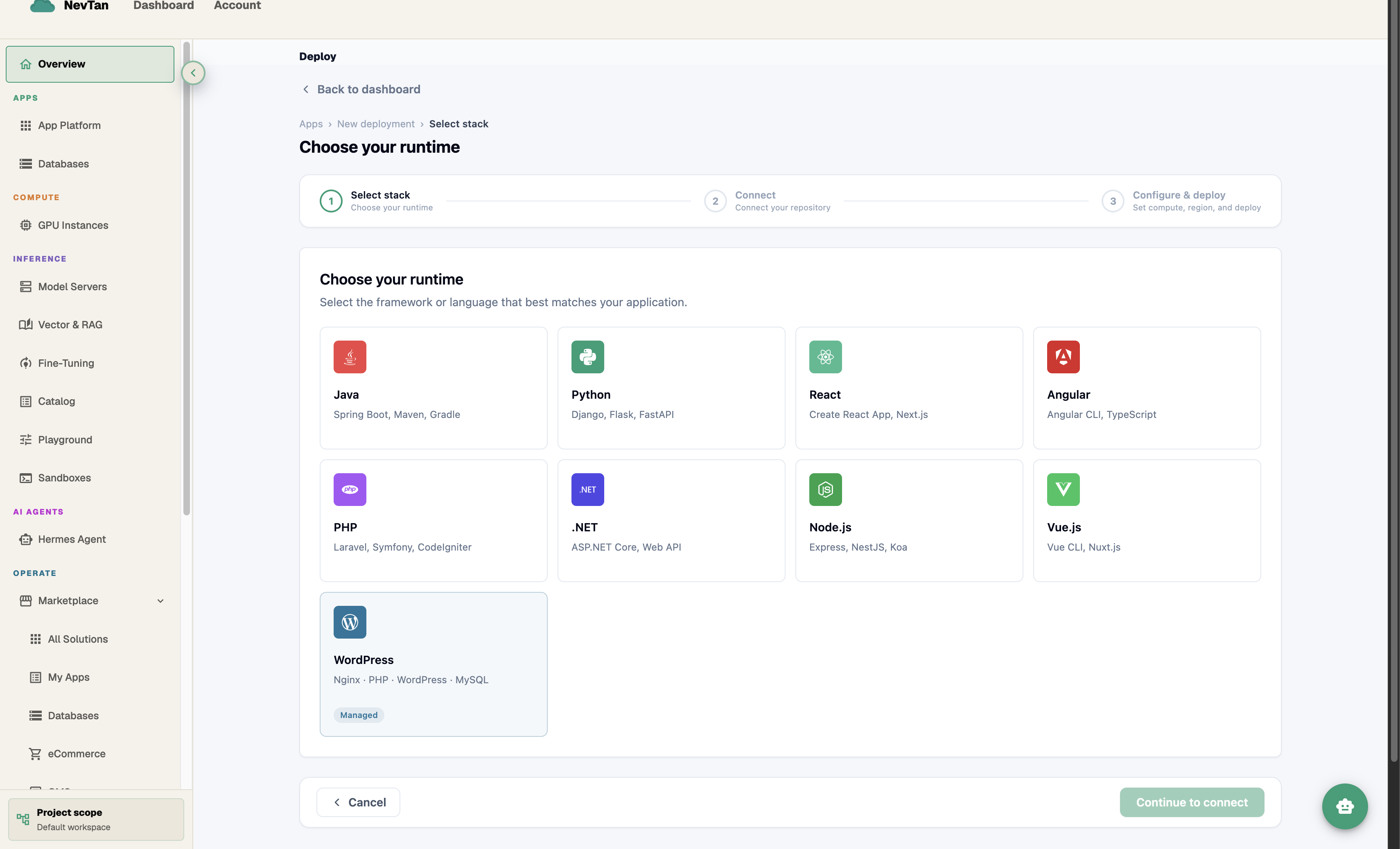
Auto-detected frameworks, or pick manually. - 2Connect your repoAuthorize GitHub or Bitbucket and pick the repository to deploy.
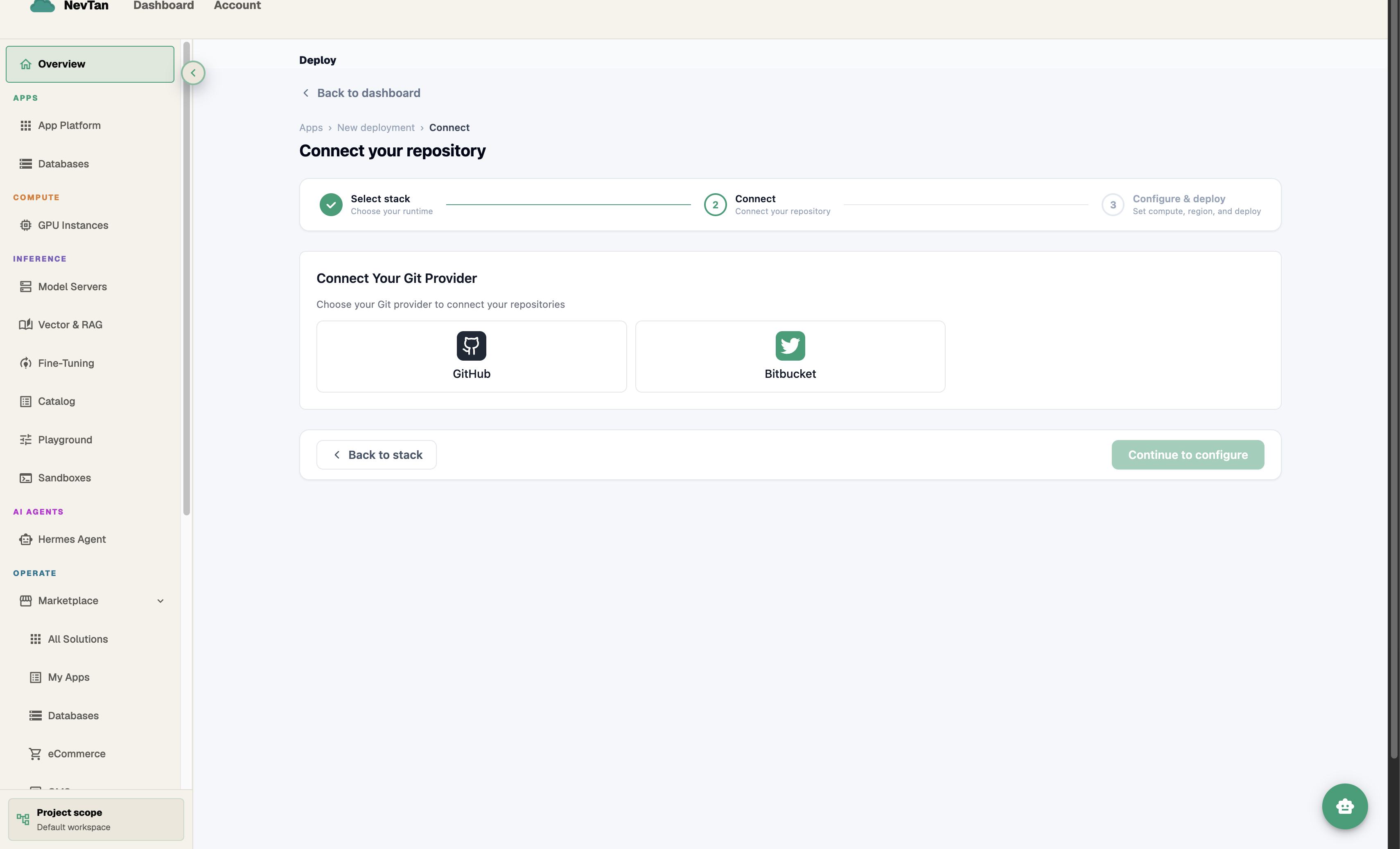
GitHub or Bitbucket — connect once, deploy any repo. - 3Configure compute and regionPick a compute tier and region. NevTan shows the estimated cost before you deploy.
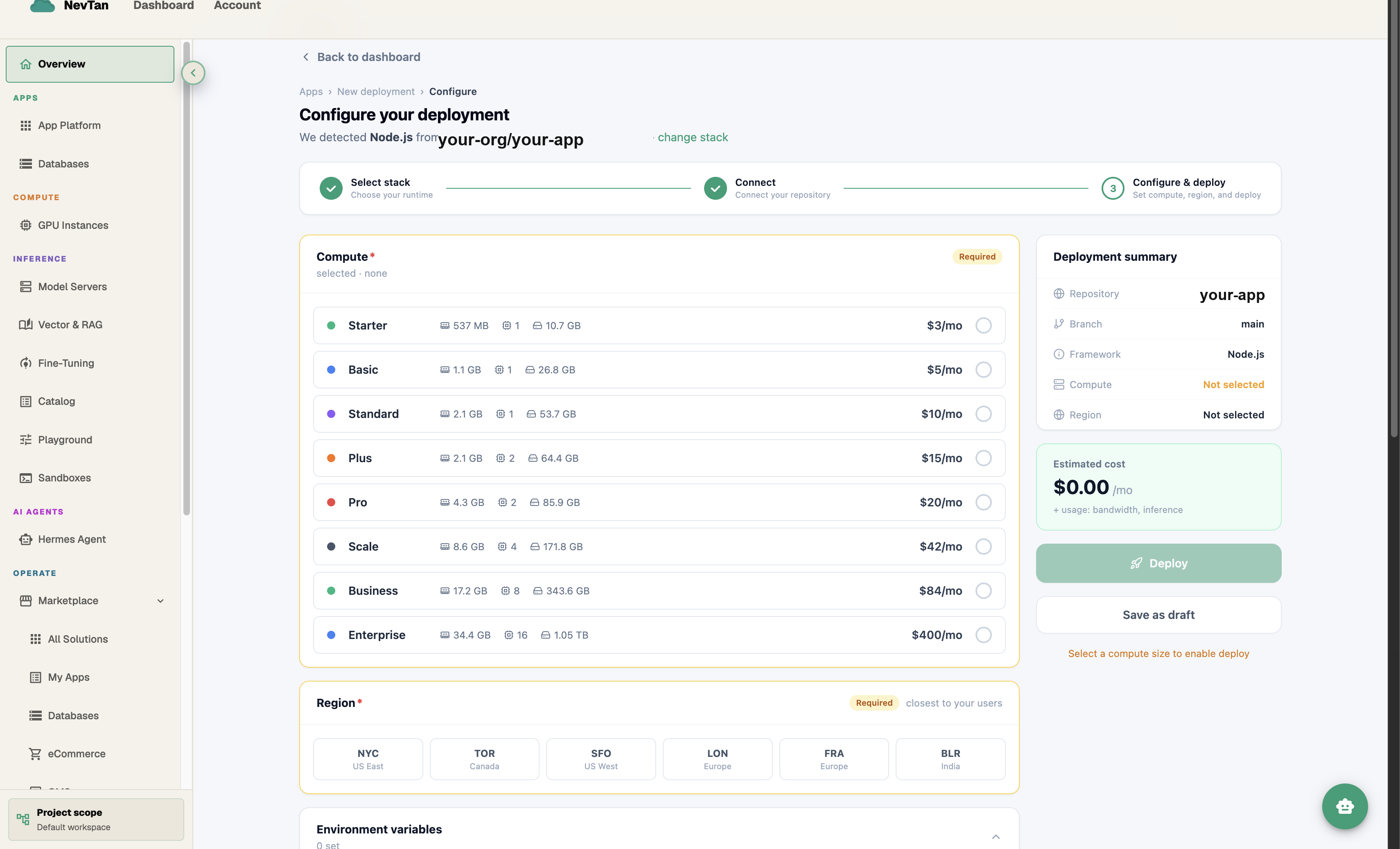
Compute tier and region, with cost estimated up front. - 4Build and deployWatch the build in real time. Traffic switches over the moment it's healthy.
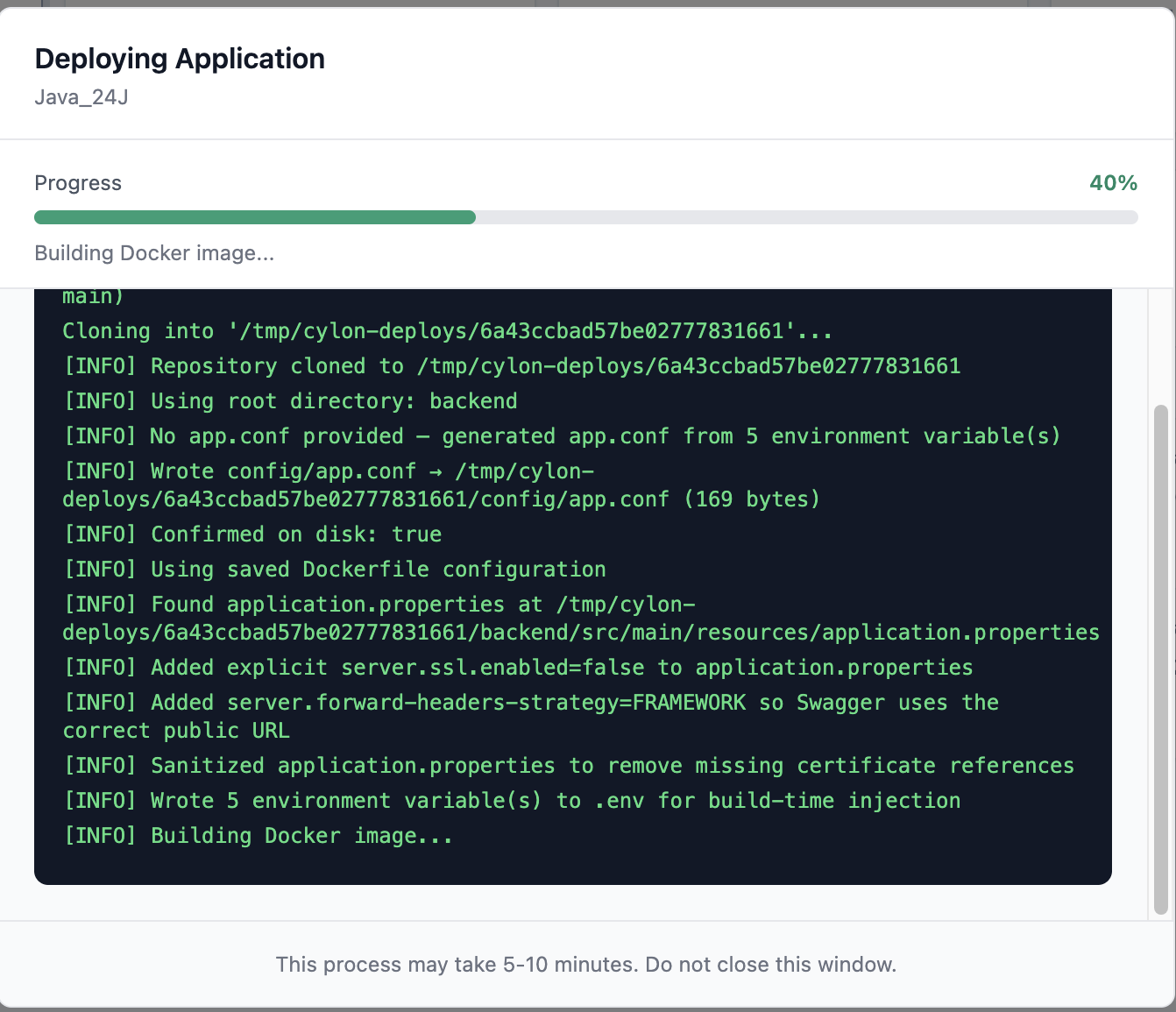
Live build logs, start to finish.
Follow the build
The console shows live logs for the whole build, and traffic switches over the moment it's healthy — no downtime, and nothing else to watch or poll yourself.
Inside the Configure & deploy step
The deploy wizard tracks your progress across three named steps: Select stack, Connect, and Configure & deploy — the last one is where region, compute, environment variables, and the Dockerfile all live together on one screen.
- Region — pick from the available regions (e.g. NYC, TOR, SFO, LON, FRA, BLR); compute pricing loads once you've picked one, since it can vary by region.
- Compute — required before you can deploy; the sidebar shows "Not selected" in orange until you pick a tier, and Deploy stays disabled with a note ("Select a compute size to enable deploy") until you do.
- Environment variables — add KEY/VALUE pairs with the + button, or use Import from .env · .conf · .ini · .toml · .yaml · .txt to pull them from a file instead of typing each one.
- Upload Configuration Files — a drag-and-drop area for files like
.env,application.properties, orapp.confthat your build needs alongside your repo. - Dockerfile — shown inline, already filled in with the auto-generated template for your detected stack, with an Edit button if you want to customise it before the first deploy (not just after — see Dockerfile).
A Deployment summary sidebar tracks Repository, Branch, Framework, Compute, and Region as you fill the form in, and an Estimated cost box shows the monthly compute price plus a reminder that bandwidth and inference are usage-based on top of it.
Supported stacks
NevTan detects your stack by looking at the files in your repo — no config file to write. If your repo already has a Dockerfile, NevTan builds from that instead and skips detection entirely.
| Stack | Detected by | Default port |
|---|---|---|
| Java (Maven) | pom.xml | 8080 |
| Java (Gradle) | build.gradle / build.gradle.kts | 8080 |
| Python | requirements.txt, pyproject.toml, Pipfile, setup.py, main.py, or app.py | 8000 |
| Next.js | next dependency or next.config.* | 3000 |
| React | react / react-dom / react-scripts / vite dependency | 80 |
| Angular | angular.json or @angular/core dependency | 80 |
| Vue | vue.config.js/.ts or vue / @vue/cli-service dependency | 80 |
| Node.js | any package.json not matched above | 3000 |
| PHP | composer.json, artisan, index.php, or public/index.php | 80 |
| .NET | any .csproj / .fsproj / .vbproj / .sln | 8080 |
- Java builds run on JDK 17 and package your app as a runnable jar — the runtime image is fixed at JDK 17 regardless of what your
pom.xml/build.gradletargets. - Next.js deploys prefer a standalone
server.jsbuild if present, otherwise fall back tonext start. - React, Angular, and Vue are static builds — output from
build/ordist/is served behind nginx, which is why their default port is 80 rather than a dev-server port. - Node.js startup auto-resolves in order:
dist/main.js,dist/index.js, annpm startscript, thenindex.js/server.js/app.js, then yourpackage.json'smainfield. - PHP automatically serves from
public/instead of the repo root when it detects Laravel or Symfony (i.e. acomposer.jsonalongside apublic/index.php). - .NET reads the target framework straight out of your project file and matches the SDK/runtime image to it (.NET 6 through 9 are detected explicitly; undetected projects default to .NET 8).
Whatever port your app listens on, add an EXPOSE line to a custom Dockerfile and NevTan will route traffic to it instead of the stack default — see Dockerfile.
Deploying a Java app
- 1Have a pom.xml or build.gradle at the repo rootA Maven project needs
pom.xml; a Gradle project needsbuild.gradleorbuild.gradle.kts. Either is enough for NevTan to recognise it as Java — no separate config file needed. - 2Select Java on the runtime screenAuto-detect picks it up from the file above, or choose it manually if you're starting a fresh project.
- 3NevTan builds itMaven projects run
mvn package -DskipTests -B; Gradle projects rungradle build -x test --no-daemon. Both build on JDK 17. - 4NevTan runs itThe built jar runs on a JDK 17 runtime image, listening on port 8080 — this is fixed regardless of the Java version your
pom.xml/build.gradletargets.
Deploying a Python app
- 1Have a dependency or entry file at the repo rootAny of
requirements.txt,pyproject.toml,Pipfile,setup.py,main.py, orapp.pyis enough for NevTan to recognise the repo as Python. - 2Select Python on the runtime screenAuto-detect picks it up, or choose it manually.
- 3DeployThe app is built and deployed listening on port 8000 by default.
- 4Need a specific framework command?Django, Flask, and FastAPI all work through this same detection — if your app needs a non-default start command (e.g. a specific
uvicorn/gunicorninvocation), set it from the redeploy screen. See Environment variables.
Deploying a Next.js app
- 1Have a next.config.* or the next dependencyA standard
create-next-appproject already satisfies this. - 2Select Next.js (or let auto-detect find it)
- 3NevTan builds itDependencies install from whichever lockfile is present (yarn, pnpm, or npm), then
next buildruns. - 4NevTan starts itA standalone
server.jsbuild is preferred if present; otherwise it falls back tonext start, thennpm start. Runs on port 3000 withNODE_ENV=productionset for you.
Deploying a React app
- 1Have react / react-dom / react-scripts / vite as a dependencyCovers Create React App and Vite-based React projects.
- 2Select React (or let auto-detect find it)
- 3NevTan builds it
npm installthennpm run build— output is read frombuild/ordist/, whichever your build produces. - 4NevTan serves itThe static build output is served behind nginx on port 80 — there's no Node process running in production, just static files.
Deploying an Angular app
- 1Have angular.json or @angular/core as a dependency
- 2Select Angular (or let auto-detect find it)
- 3NevTan builds itDependencies install with
--legacy-peer-deps, thennpm run build --if-presentruns. - 4NevTan serves itOutput is served behind nginx on port 80, with SPA fallback configured so client-side routes reload correctly instead of 404ing.
Deploying a Vue app
- 1Have vue.config.js/.ts or vue / @vue/cli-service as a dependency
- 2Select Vue (or let auto-detect find it)
- 3NevTan builds it
npm run buildruns, with the native build tools Vue's dependency tree sometimes needs already installed in the build image. - 4NevTan serves itOutput is served behind nginx on port 80.
Deploying a Node.js app
- 1Have a package.jsonThis is the catch-all for any Node backend that isn't Next.js — Express, NestJS, Koa, and similar.
- 2Select Node.js (or let auto-detect find it)
- 3NevTan builds itDependencies install from your lockfile, and
npm run buildruns if yourpackage.jsondefines a build script. - 4NevTan starts itStartup resolves in order:
dist/main.js, thendist/index.js, then annpm startscript (nodemon/ts-node-dev dev-only scripts are skipped), thenindex.js/server.js/app.js, then yourpackage.json'smainfield. Listens on port 3000.
Deploying a PHP app
- 1Have composer.json, artisan, or an index.phpCovers plain PHP as well as Laravel, Symfony, and CodeIgniter.
- 2Select PHP (or let auto-detect find it)
- 3NevTan builds itIf a
composer.jsonis present,composer install --no-devruns to pull in dependencies. - 4NevTan serves itLaravel and Symfony projects (a
composer.jsonalongsidepublic/index.php) are automatically served frompublic/instead of the repo root. Runs on port 80.
Deploying a .NET app
- 1Have a .csproj, .fsproj, .vbproj, or .sln at the repo root
- 2Select .NET (or let auto-detect find it)
- 3NevTan matches the SDK to your target framework.NET 6 through 9 are detected directly from your project file; if none is detected, the build defaults to .NET 8.
- 4NevTan runs itListens on port 8080.