
Connecting
Find your connection details on the Connect tab and connect with psql, mysql, mongosh, redis-cli, or from your app.
Once a cluster is active and at least one trusted source is allowed, connect to it exactly like you would any standard instance of that engine.
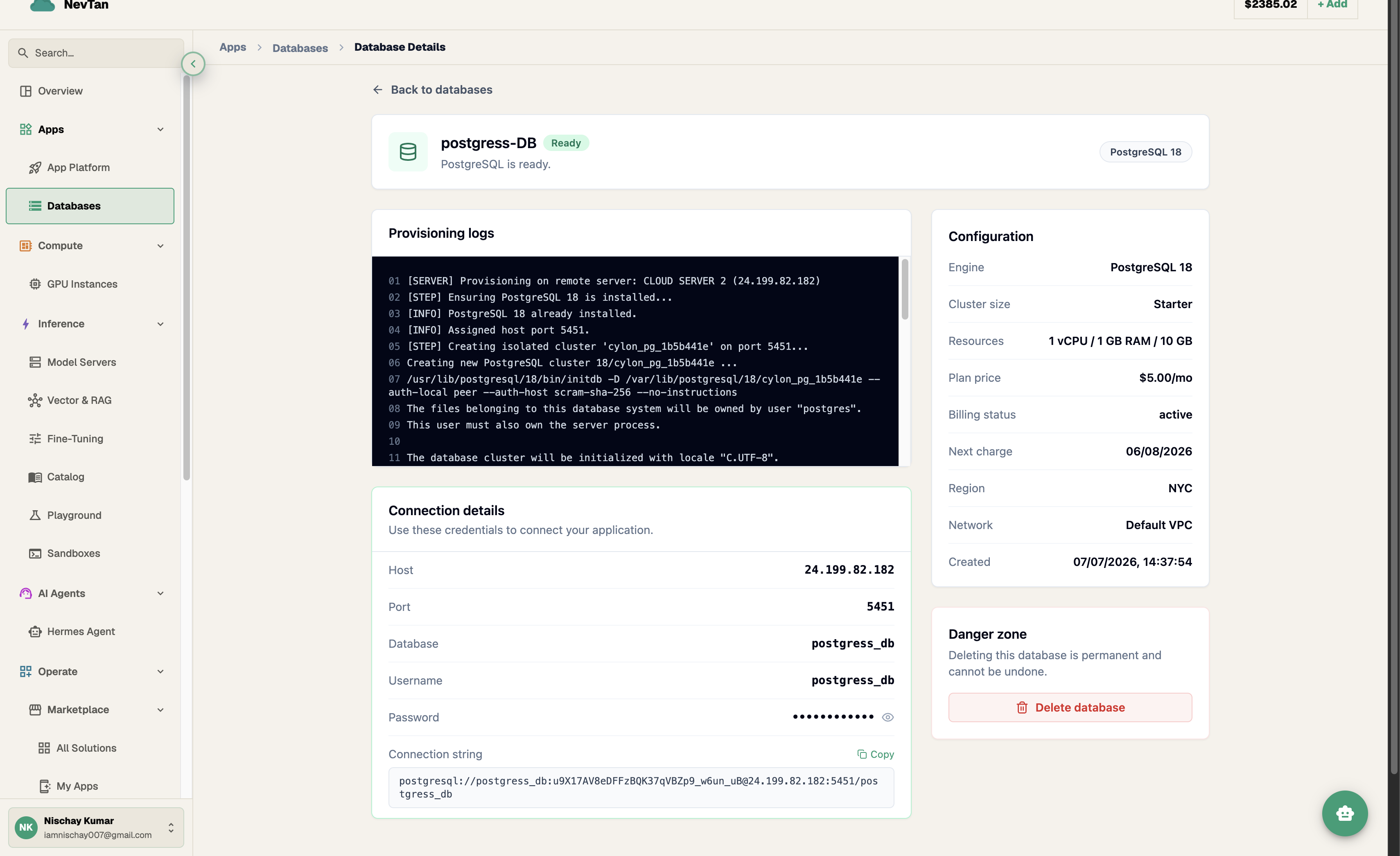
Open the database's page — the Connection details section (shown once the cluster is active) lists Host, Port, Database, Username, and Password as label/value rows. The password is masked by default; click the eye icon to reveal it. If a ready-to-use connection string is available, it appears in its own block with a Copy button (it briefly reads "Copied!" after you click it). Use these with any standard client, ORM, or driver; there is no proprietary protocol or SDK to learn.
Connect from a client
Each engine has a standard CLI client that accepts the connection details shown on the Connect tab directly — swap in the exact Host, Port, Database, and Username shown on your database's page:
Use it from an app
Store the connection URI as a DATABASE_URL environment variable — see Environment variables if the app lives on App Platform — and read it at runtime rather than hard-coding host, port, or credentials.
Connection pooling
Every package caps the number of simultaneous connections (see Packages). Opening a fresh connection per request — common in serverless and short-lived-process environments — burns through that ceiling fast and adds connection-setup latency to every request. Use a pooler in front of your app (e.g. your ORM's built-in pool, or a client-side connection pool like pg.Pool above) so a fixed, small number of real connections is shared across requests instead of one-per-request.
What goes wrong without one
Without pooling, connection count scales with concurrent requests, not with traffic you've actually planned for. A quiet app can look fine for weeks and then take a burst of concurrent requests — a traffic spike, a batch job, a few extra app instances spinning up — and each one opens its own connection at the same moment. Once the running total hits the package's max-connections ceiling, the database starts refusing new connections outright. From the app's side that shows up as some requests succeeding and others failing with a connection error or timeout, at exactly the moment traffic is highest — the opposite of graceful degradation.
This pattern is easy to misdiagnose, because it looks like a database problem — timeouts, refused connections — when the actual cause is upstream: too many short-lived connections competing for a fixed ceiling. A pooler fixes it structurally by capping how many real connections your app ever opens, so request volume can grow without connection count growing alongside it.